

Costs and Billing
Using the Agent Studio incurs costs for the Organization. Starting servers, storing data, and using chat APIs all come with a cost. We've created this page to be transparent about how costs are accrued and give some examples to help users better understand where the costs come from.
Where do costs come from?
There are three main drivers for costs:
- Server Costs - Depending on the instance type selected, it will incur an hourly cost. Larger and more capable instances tend to cost more than lightweight instances.
- Storage Costs - Block storage is used by the filesystem when we run servers. You can select the size of the block storage at server startup time.
- Token Costs - Chat API usage is billed per token, with input and output tokens tracked separately. Token rates vary by model and provider. We support major providers including Anthropic, OpenAI, and Google Gemini, with additional providers added over time.
Understanding credits, billing periods, and payments
Rendered.ai provides credits to new Organizations that want to try the Agent Studio, allowing them to create accounts and experiment with Agents before they commit. As these credits are used, the Organization Administrator will receive notification emails to configure a default Payment Method to avoid service interruption.
⚠ Warning
If the credits run out and your Organization does not have a Payment Method configured, the servers in the Organization will be stopped and your Users will be locked out of the Organization until a Payment Method is set.
Invoices for billing are sent on a monthly basis, and will be auto-charged to the Organization's default credit card at the end of the billing period. You can configure the default card through the Billing tab by clicking the Manage button in the Payment Details section.
How to view your cost breakdown
Administrators can view a cost breakdown for the current and previous billing periods in the Billing tab of the Organization Settings page. This page allows you to see the breakdown in cost by cost type: servers, storage, and tokens. It also allows you to drill down into which users, instance types, and models are driving the costs.
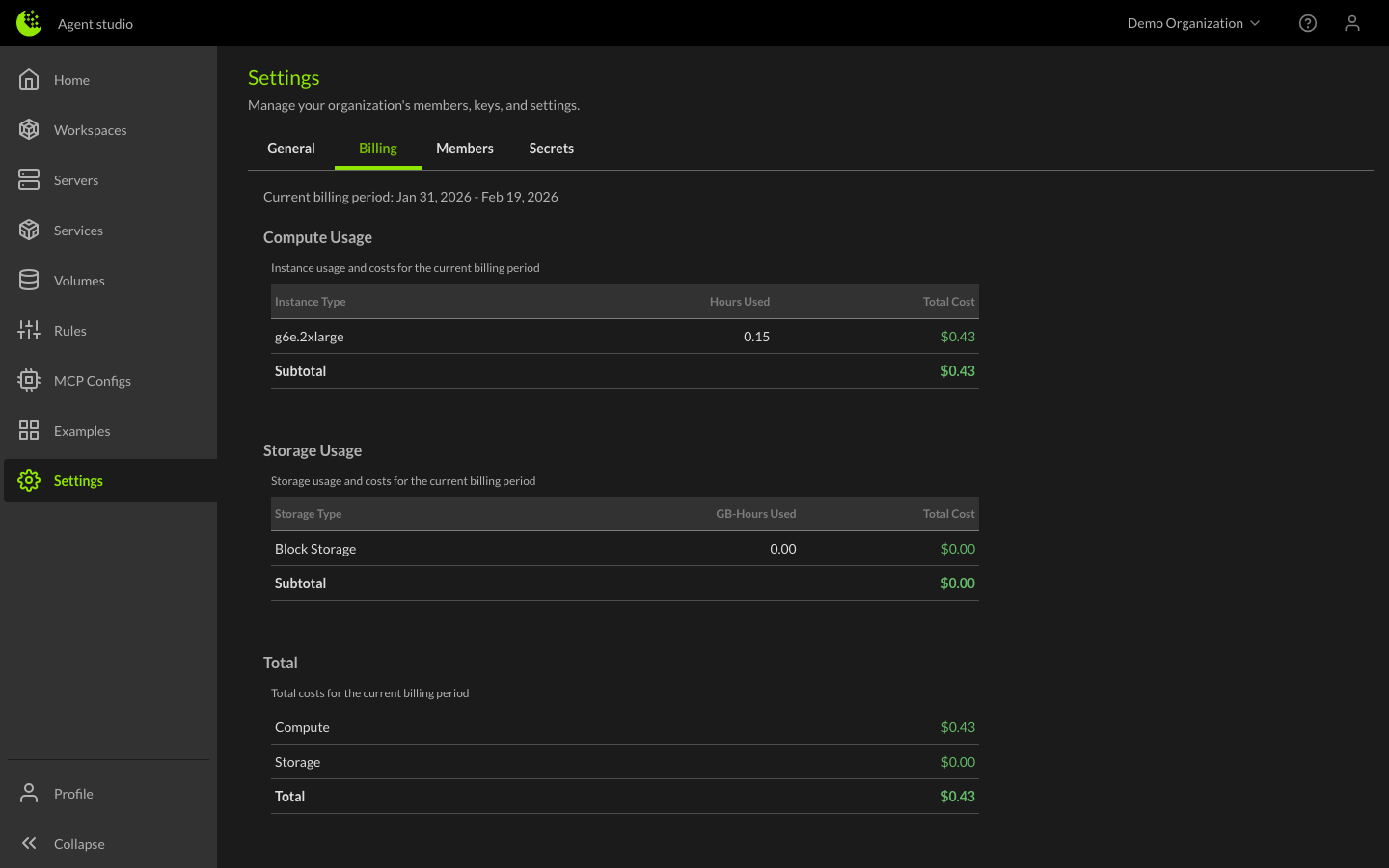
Examples
Here are some example scenarios for how costs are calculated at the end of the month.
Example 1 - Light Use
A single user in the organization has used 1x t3.xlarge server for 120 hours this month, the server is configured with 500GB of storage and has been around for 200 hours. The user has also used the chat API with Claude Sonnet, consuming approximately 2M input tokens and 500K output tokens over the month.
| Cost Type | Calculation | Subtotal |
|---|---|---|
| Server Costs - t3.xlarge | 120hrs × $0.22/hr | $26.40 |
| Storage Costs - t3.xlarge | 500GB × 200hr × $0.11/GB-month | $18.58 |
| Token Costs - Claude Sonnet (input) | 2M tokens × $3.90/1M tokens | $7.80 |
| Token Costs - Claude Sonnet (output) | 0.5M tokens × $19.50/1M tokens | $9.75 |
| Total | $62.53 |
Example 2 - Heavy Use
An Organization with 10 users across various instance types. Four users run t3.xlarge instances averaging 160 hours each, three users run t3.2xlarge instances averaging 200 hours each, two users run g4dn.xlarge GPU instances averaging 150 hours each, and one user runs a g4dn.2xlarge GPU instance for 180 hours. Standard instances are configured with 500GB of block storage and GPU instances with 1000GB. Users across the organization also actively use chat APIs with a mix of models.
| Cost Type | Calculation | Subtotal |
|---|---|---|
| Server - t3.xlarge | 4 × 160hrs × $0.22/hr | $140.80 |
| Server - t3.2xlarge | 3 × 200hrs × $0.43/hr | $258.00 |
| Server - g4dn.xlarge | 2 × 150hrs × $0.68/hr | $204.00 |
| Server - g4dn.2xlarge | 1 × 180hrs × $1.37/hr | $246.60 |
| Storage - t3.xlarge | 4 × 500GB × 160hrs × $0.11/GB-month | $48.22 |
| Storage - t3.2xlarge | 3 × 500GB × 200hrs × $0.11/GB-month | $45.21 |
| Storage - g4dn.xlarge | 2 × 1000GB × 150hrs × $0.11/GB-month | $45.21 |
| Storage - g4dn.2xlarge | 1 × 1000GB × 180hrs × $0.11/GB-month | $27.12 |
| Tokens - Claude Sonnet (input) | 25M tokens × $3.90/1M tokens | $97.50 |
| Tokens - Claude Sonnet (output) | 6M tokens × $19.50/1M tokens | $117.00 |
| Tokens - GPT-4o (input) | 15M tokens × $3.25/1M tokens | $48.75 |
| Tokens - GPT-4o (output) | 4M tokens × $13.00/1M tokens | $52.00 |
| Tokens - Gemini 2.5 Pro (input) | 10M tokens × $1.63/1M tokens | $16.30 |
| Tokens - Gemini 2.5 Pro (output) | 3M tokens × $13.00/1M tokens | $39.00 |
| Total | $1,385.71 |